How to solve it
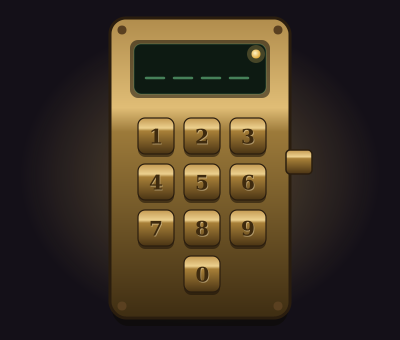
A keypad with a small display above it. It might be clockwork brass, dwarven stone or a pad of arcane sigils. Punch in the secret code and press Enter.
- Press a key by clicking or tapping it, or type its symbol on your keyboard. Letters work in either case.
- Fix a mistake with Backspace before you submit.
- Submit with Enter. The keypad won't take a code until it's the full length.
Everyone watching sees each key go in as you type. A right code chimes and the light goes green. A wrong one buzzes, flashes red and clears the display, and costs one attempt.
Every code you've tried is written on a paper tape under the pad, the last 20 of them, along with whatever the keypad told you. That's where the solving happens. Some keypads only buzz. Some tell you how many keys were in the right place. The kindest tell you how many were right and in place and how many were right but in the wrong spot, like the board game Mastermind. Read the tape and narrow it down.
Look at the keys themselves, too. On some pads the keys the code uses are visibly worn.
Setting it up
- Keys is a phone-style number pad, the letters A to P, twelve Elder Futhark runes, or your own set of 2 to 16 symbols (emoji work).
- Code length is 3 to 10. Difficulty sets it to 3 on Easy, rising by one per tier to 6 on Deadly.
- Keys per row is automatic unless you want a particular shape.
- Code appears when you write the solution yourself, or use Set the solution by playing and type it on the pad. A generated code doesn't repeat keys unless it's longer than the number of keys.
- A wrong code tells the players nothing, how many keys are in the right place, or right place plus right key in the wrong place. Easy and Medium use the full Mastermind scoring. Hard and Deadly only count the keys in the right place.
- The keys the code uses are worn shows which keys are smudged, but never their order or how often one repeats. Easy turns it on.
- Clue sits on a plate beside the pad, up to 500 characters.
Pair the puzzle's attempt limit with the feedback. Mastermind scoring with unlimited attempts is a sure thing in the end. Buzz-only feedback with three attempts needs the clue to do real work. Rule out a wrong option marks one clean key the code doesn't use.
Where it fits in a campaign
- The artificer's workshop. A brass keypad on the door, and four keys worn shiny. The party knows which digits, but not the order, so the tape does the rest.
- A rune-locked forge. Dwarven runes and a clue in the clan's own verse. The cleric who read the ancestor wall earlier can translate it.
- The cult's back door. The code is a date: the night the cult's founder died. One cultist's diary mentions it, in passing, three pages before the part everyone reads.
Running any puzzle
Every puzzle type is built and run the same way. The guide above covers what's particular to this one.
Write it once
A puzzle is a compendium entry. Create a new Puzzle in one of your compendiums and choose its type. The form has four tabs. Overview holds the type, a spoiler-free flavour line, an optional cover image and the settings below.
- Who operates it is one player driving while the party watches, everyone operating it, or you operating it while players watch. You can always operate it yourself, whatever you pick.
- Difficulty is Easy, Medium, Hard or Deadly. Changing it rewrites the settings that tier controls and leaves your solution and text alone, so pick a tier first and fine-tune afterwards.
- Solution is either written by you or generated each time the puzzle is placed. Generated is the default, so players who own the puzzle can't look up the answer. Reroll the solution each session gives a recurring puzzle a fresh answer every session.
- Limits set a maximum number of attempts, a time limit (with the option to show players the timer) and a lockout. With a lockout, running out of attempts locks the puzzle for a while. Without one, the puzzle fails.
The other three tabs are Mechanism, which holds the settings described above, Hints, where you write up to ten hints to reveal from the board when you choose, and Presentation, for the skin, the title, an intro and the text players see on success or failure.
Put it on the board
At the table, open the Puzzles tab in the dock and drag a puzzle onto the map, or click it to drop it in the middle of your view. That makes a copy for this table only. Its progress lives with the table, and the compendium entry stays untouched. Most puzzles sit on the map as an object. Pressure plates and rune sequences can also lay tiles on the scene for tokens to step on.
There's no separate step to start it. The first player to touch it starts it. In single-driver mode, that player takes the controls and everyone else watches every move live.
Run it live
Right-click a placed puzzle for the DM's controls. The most useful ones:
- Reveal a hint and Rule out a wrong option for a party that's stuck.
- Open it by magic (Knock) or Force it open when a spell or a crowbar should simply win.
- Give one more attempt, Pause the timer and Reset.
- Approve the solve or Reject the solve, with an optional reply, if you asked to approve solves first.
- Set up… to change this table's copy and choose what happens When it is solved and When it fails. Outcomes can open or unlock a door, reveal a token, object, handout or another puzzle, play an effect, post to chat, roll damage or start combat.
Skip the minigame
Not every table wants to play every puzzle. Set a placement's Just roll option to Always and the puzzle shows a single Roll to resolve button instead. Players roll the puzzle's Just roll skill against its DC, which defaults to Investigation at DC 15. A pass solves it and a fail costs an attempt. Set it to Never to make the party play it out.