How to solve it
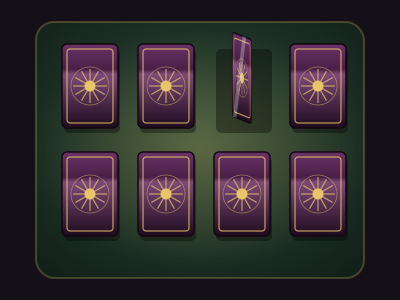
A spread of face-down cards, dealt in pairs: tarot cards, carved tiles or mirror shards. Turn two cards a turn. If they match, they stay face up. If not, they turn back. Find every pair to win.
Every card you turn is shown to the whole table, so the party remembers together. Somebody should be keeping notes.
- Turn a card by clicking or tapping it. On the keyboard, the arrow keys move between cards and Enter or Space turns one. A turn can't be taken back.
- Glimpse, or press G, to see the whole spread for a moment, if the deck allows any glimpses. You can't glimpse halfway through a turn.
- Try to recall rolls Insight. A pass shows the table one face-down pair for a moment.
A match sparkles and names the card. A mismatch shakes, stays up for about a second so everyone can see it, then turns back. Mismatches don't use the puzzle's attempts. Some decks have a mismatch limit, though, and hitting it fails the puzzle outright. The tally above the cards shows pairs found and mismatches so far.
Setting it up
- Pairs runs from 3 to 12, for twice as many cards.
- Cards per row is automatic unless you want a particular shape.
- Card faces are tarot arcana, runes, heraldic sigils, your own glyphs (one per pair) or your own pictures. Upload a picture per pair, and players only ever see one once a card showing it is turned.
- Mismatch limit is blank for no limit, or 1 to 99.
- Glimpses gives the party up to 3 looks at the whole spread, each lasting the Glimpse length. The Try to recall check shows a pair for the same length.
- Deal number fixes the layout when you write the solution. The same number always deals the same spread. Otherwise every deal is shuffled.
- Clue is optional text shown above the cards.
Difficulty runs from 4 pairs, no limit and 2 glimpses on Easy to 10 pairs, 11 mismatches and no glimpses on Deadly. The Insight check uses the puzzle's Just roll DC. Memory match works in every mode, including everyone operating it at once, which suits a big table. Rule out a wrong option sets one pair aside face up, but never the last one.
Where it fits in a campaign
- The fortune teller's game. A carnival tent and a tarot deck. Win and she tells the party something true. Lose and the failure outcome posts a prophecy they'd rather not have heard.
- The hall of mirrors. Mirror shards with your own pictures: the faces of NPCs the party has met. Matching them in pairs reveals who has been wearing two faces.
- A test of the order. Monks guard their library with carved tiles of their sacred sigils. A novice would know them by heart. The party, sadly, does not.
Running any puzzle
Every puzzle type is built and run the same way. The guide above covers what's particular to this one.
Write it once
A puzzle is a compendium entry. Create a new Puzzle in one of your compendiums and choose its type. The form has four tabs. Overview holds the type, a spoiler-free flavour line, an optional cover image and the settings below.
- Who operates it is one player driving while the party watches, everyone operating it, or you operating it while players watch. You can always operate it yourself, whatever you pick.
- Difficulty is Easy, Medium, Hard or Deadly. Changing it rewrites the settings that tier controls and leaves your solution and text alone, so pick a tier first and fine-tune afterwards.
- Solution is either written by you or generated each time the puzzle is placed. Generated is the default, so players who own the puzzle can't look up the answer. Reroll the solution each session gives a recurring puzzle a fresh answer every session.
- Limits set a maximum number of attempts, a time limit (with the option to show players the timer) and a lockout. With a lockout, running out of attempts locks the puzzle for a while. Without one, the puzzle fails.
The other three tabs are Mechanism, which holds the settings described above, Hints, where you write up to ten hints to reveal from the board when you choose, and Presentation, for the skin, the title, an intro and the text players see on success or failure.
Put it on the board
At the table, open the Puzzles tab in the dock and drag a puzzle onto the map, or click it to drop it in the middle of your view. That makes a copy for this table only. Its progress lives with the table, and the compendium entry stays untouched. Most puzzles sit on the map as an object. Pressure plates and rune sequences can also lay tiles on the scene for tokens to step on.
There's no separate step to start it. The first player to touch it starts it. In single-driver mode, that player takes the controls and everyone else watches every move live.
Run it live
Right-click a placed puzzle for the DM's controls. The most useful ones:
- Reveal a hint and Rule out a wrong option for a party that's stuck.
- Open it by magic (Knock) or Force it open when a spell or a crowbar should simply win.
- Give one more attempt, Pause the timer and Reset.
- Approve the solve or Reject the solve, with an optional reply, if you asked to approve solves first.
- Set up… to change this table's copy and choose what happens When it is solved and When it fails. Outcomes can open or unlock a door, reveal a token, object, handout or another puzzle, play an effect, post to chat, roll damage or start combat.
Skip the minigame
Not every table wants to play every puzzle. Set a placement's Just roll option to Always and the puzzle shows a single Roll to resolve button instead. Players roll the puzzle's Just roll skill against its DC, which defaults to Investigation at DC 15. A pass solves it and a fail costs an attempt. Set it to Never to make the party play it out.