How to solve it
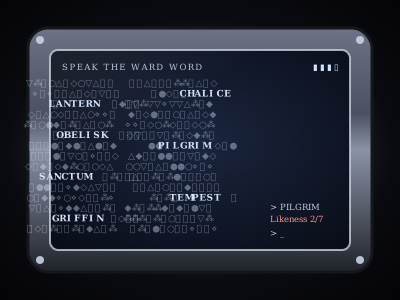
A screen of glyph noise on an arcane slate, a dwarven rune console or a gnomish clockwork screen. Hidden in the noise are a handful of words, all the same length. One of them is the password. If you've played Fallout, you know this one.
- Try a word by clicking it.
- On the keyboard, the arrow keys move the cursor, typing a letter jumps to the next word starting with it, and Enter tries what's under the cursor.
A wrong word is refused with its likeness: how many of its letters match the password in the same position. If PLATE scores 3 of 5, the password shares exactly three letters in place with PLATE. Compare likenesses and you can cross words off fast. Each wrong word costs one of your tries for this boot, shown on the meter.
The noise also hides bracket pairs. Half of them are live. A live pair burns away one false word, or now and then restores all your tries. The other half are decoys that spark and cost a try. Nobody can tell which is which until it's clicked.
Run out of tries and the slate seals itself. The glyphs rearrange into a new board, your tries refill, and the puzzle loses one attempt. If someone's clever, the rim buttons help. Study rolls Investigation and Read rolls Arcana. Either can be used once per board, and a pass burns away one to three false words depending on how well it went.
Setting it up
- Word length runs from 4 to 12 letters.
- Words on the slate runs from 6 to 20.
- Tries per boot runs from 3 to 8.
- Live glyph pairs runs from 0 to 4. The board gets twice that many pairs, half live and half decoys.
- Password is letters only and appears when you write the solution yourself.
- Your own words replaces the built-in dungeon word list. Every word has to match the word length.
- Inscription is the header across the top of the screen, up to 120 characters.
Difficulty runs from 8 five-letter words with 5 tries and 3 live pairs on Easy to 18 eleven-letter words with 3 tries and 1 pair on Deadly. Every board is checked before the players see it, so the password can always be found from likeness alone within the tries allowed. If your own word list can't manage that, Bookwyrm tells you when you save. The Study DC is 8 plus half the number of words. Rule out a wrong option burns away one false word.
Where it fits in a campaign
- The lich's lectern. An arcane slate guarding a spellbook. Fill the word list with eight-letter words from the lich's own vocabulary, like OBLIVION, DOMINION and ETERNITY.
- A gnome's security system. The clockwork screen on a workshop door in a city of inventors. Make the inscription a smug note from the gnome.
- The archive index. A dwarven rune console that opens one vault in a hall of hundreds. Use Easy, put it at the end of a long dungeon, and let the party enjoy being clever for once.
Running any puzzle
Every puzzle type is built and run the same way. The guide above covers what's particular to this one.
Write it once
A puzzle is a compendium entry. Create a new Puzzle in one of your compendiums and choose its type. The form has four tabs. Overview holds the type, a spoiler-free flavour line, an optional cover image and the settings below.
- Who operates it is one player driving while the party watches, everyone operating it, or you operating it while players watch. You can always operate it yourself, whatever you pick.
- Difficulty is Easy, Medium, Hard or Deadly. Changing it rewrites the settings that tier controls and leaves your solution and text alone, so pick a tier first and fine-tune afterwards.
- Solution is either written by you or generated each time the puzzle is placed. Generated is the default, so players who own the puzzle can't look up the answer. Reroll the solution each session gives a recurring puzzle a fresh answer every session.
- Limits set a maximum number of attempts, a time limit (with the option to show players the timer) and a lockout. With a lockout, running out of attempts locks the puzzle for a while. Without one, the puzzle fails.
The other three tabs are Mechanism, which holds the settings described above, Hints, where you write up to ten hints to reveal from the board when you choose, and Presentation, for the skin, the title, an intro and the text players see on success or failure.
Put it on the board
At the table, open the Puzzles tab in the dock and drag a puzzle onto the map, or click it to drop it in the middle of your view. That makes a copy for this table only. Its progress lives with the table, and the compendium entry stays untouched. Most puzzles sit on the map as an object. Pressure plates and rune sequences can also lay tiles on the scene for tokens to step on.
There's no separate step to start it. The first player to touch it starts it. In single-driver mode, that player takes the controls and everyone else watches every move live.
Run it live
Right-click a placed puzzle for the DM's controls. The most useful ones:
- Reveal a hint and Rule out a wrong option for a party that's stuck.
- Open it by magic (Knock) or Force it open when a spell or a crowbar should simply win.
- Give one more attempt, Pause the timer and Reset.
- Approve the solve or Reject the solve, with an optional reply, if you asked to approve solves first.
- Set up… to change this table's copy and choose what happens When it is solved and When it fails. Outcomes can open or unlock a door, reveal a token, object, handout or another puzzle, play an effect, post to chat, roll damage or start combat.
Skip the minigame
Not every table wants to play every puzzle. Set a placement's Just roll option to Always and the puzzle shows a single Roll to resolve button instead. Players roll the puzzle's Just roll skill against its DC, which defaults to Investigation at DC 15. A pass solves it and a fail costs an attempt. Set it to Never to make the party play it out.