How to solve it
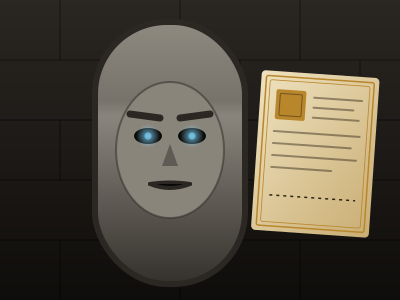
A riddle, spoken by a carved stone face, written on an ancient scroll or asked by a sphinx. Beside it is a manuscript where you record what you find and offer your answer. There may also be a scene to study, either a picture or a room with points of interest marked on it.
- Examine a point of interest by clicking its numbered pin. Its description appears for everyone.
- Point to this when you think a point you've examined is the answer. On a scene picture, you can click anywhere to drop a marker instead.
- Zoom and pan with the scroll wheel, the + and − buttons, and dragging. Show the whole scene zooms back out.
- Answer by writing in the box and pressing Enter, or the seal underneath.
- Hear it again replays the riddle.
Unlike every other puzzle, the answer isn't checked by the computer. Your DM judges it. Bookwyrm suggests a verdict to them, and it forgives typos, capitals and a stray "the", but the DM always decides. So a clever answer that isn't on their list can still win.
A rejected answer gets a no from the speaker. That doesn't cost a puzzle attempt, but every answer you offer uses one of the answers allowed. Run out and the DM decides what happens next.
If the puzzle allows it, Search rolls a skill check. A pass rules out one point of interest that isn't the answer.
Setting it up
- Riddle or question is the only required field, up to 1200 characters.
- Scene image is optional. Players can zoom, pan and point at it.
- Players answer by saying or writing it, pointing at it, or either. Pointing needs a scene image or at least two points of interest.
- Points of interest holds up to 12, each with a label, a position across and down the scene, and what the party finds when they examine it.
- Answers allowed is 1 to 20, or blank for no limit. It's the only thing difficulty changes: no limit on Easy, then 5, 3 and a single answer on Deadly.
- Search check is a skill and a DC. The button only appears when both are set and you've marked answer spots.
The For your eyes only section is never sent to players. It holds the answers you'd accept, circles marking the answer spots on the scene, and your notes for judging. Every solve waits for your approval, so you can read the answer out, enjoy it, and then decide. There's no randomness here, so a generated solution doesn't apply.
Observation works in every mode, including everyone operating it at once. Rule out a wrong option rules out one point of interest that isn't an answer spot.
Where it fits in a campaign
- The sphinx at the pass. The classic riddle. Allow one answer on Deadly, and let the table argue about it for ten minutes before anyone speaks.
- The murder room. Upload the scene, mark the overturned chair, the cold hearth and the two wine glasses, and ask who poisoned whom. Accept a pointed answer at the second glass.
- The riddle door with a twist. The door asks what it is made of. The answer is in the room's description of the walls, three paragraphs back, and the party skimmed it.
Running any puzzle
Every puzzle type is built and run the same way. The guide above covers what's particular to this one.
Write it once
A puzzle is a compendium entry. Create a new Puzzle in one of your compendiums and choose its type. The form has four tabs. Overview holds the type, a spoiler-free flavour line, an optional cover image and the settings below.
- Who operates it is one player driving while the party watches, everyone operating it, or you operating it while players watch. You can always operate it yourself, whatever you pick.
- Difficulty is Easy, Medium, Hard or Deadly. Changing it rewrites the settings that tier controls and leaves your solution and text alone, so pick a tier first and fine-tune afterwards.
- Solution is either written by you or generated each time the puzzle is placed. Generated is the default, so players who own the puzzle can't look up the answer. Reroll the solution each session gives a recurring puzzle a fresh answer every session.
- Limits set a maximum number of attempts, a time limit (with the option to show players the timer) and a lockout. With a lockout, running out of attempts locks the puzzle for a while. Without one, the puzzle fails.
The other three tabs are Mechanism, which holds the settings described above, Hints, where you write up to ten hints to reveal from the board when you choose, and Presentation, for the skin, the title, an intro and the text players see on success or failure.
Put it on the board
At the table, open the Puzzles tab in the dock and drag a puzzle onto the map, or click it to drop it in the middle of your view. That makes a copy for this table only. Its progress lives with the table, and the compendium entry stays untouched. Most puzzles sit on the map as an object. Pressure plates and rune sequences can also lay tiles on the scene for tokens to step on.
There's no separate step to start it. The first player to touch it starts it. In single-driver mode, that player takes the controls and everyone else watches every move live.
Run it live
Right-click a placed puzzle for the DM's controls. The most useful ones:
- Reveal a hint and Rule out a wrong option for a party that's stuck.
- Open it by magic (Knock) or Force it open when a spell or a crowbar should simply win.
- Give one more attempt, Pause the timer and Reset.
- Approve the solve or Reject the solve, with an optional reply, if you asked to approve solves first.
- Set up… to change this table's copy and choose what happens When it is solved and When it fails. Outcomes can open or unlock a door, reveal a token, object, handout or another puzzle, play an effect, post to chat, roll damage or start combat.
Skip the minigame
Not every table wants to play every puzzle. Set a placement's Just roll option to Always and the puzzle shows a single Roll to resolve button instead. Players roll the puzzle's Just roll skill against its DC, which defaults to Investigation at DC 15. A pass solves it and a fail costs an attempt. Set it to Never to make the party play it out.