How to solve it
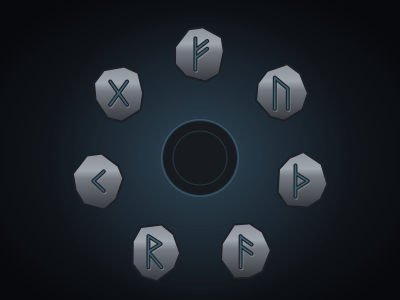
A ring of carved stones surrounds an altar. Each stone rings its own bell note when pressed. Press them in the right order and the whole ring lights up.
How you learn the order depends on the puzzle. Some play one more rune each round, like Simon, and you repeat what you heard. Some play the full sequence once and you repeat it. Some never play at all, and the order is hidden somewhere in the room for you to work out.
- Press a rune by clicking or tapping it, or by pressing its number key (1 to 9, then 0).
- On the keyboard, the arrow keys move between stones and Enter or Space presses the focused one.
- Listen again, or press R, to replay the sequence.
- Step on the tiles. The runes can also be laid out as tiles on the map, so the party can walk their tokens across them.
A correct rune lights up and joins a glowing trail. A wrong one flares red with a clang. Usually that sends you back to the first rune and costs an attempt, but the DM can soften either rule.
If someone knows magic, Study the runes rolls Arcana. A pass marks the next rune in the sequence.
Setting it up
- Carved runes holds 3 to 12 runes, each with an optional caption. Their order is the order of their notes, lowest first, so any sequence plays as a tune.
- How the party learns the order is Simon (one more rune each round), played in full then repeated, or found in the room and never played.
- Order to press them in takes 2 to 16 runes when you write the solution. A rune can't follow itself. With a generated solution, set the Generated sequence length instead.
- Each rune sings for sets the tempo, from 250 to 2000 milliseconds.
- Clue shown to the party is for the found-in-the-room style, or for a hint in the other two.
- A wrong rune sends the party back to the start and A wrong rune costs an attempt are both on by default. Easy turns off the attempt cost.
- Scene tiles puts the runes on the map in a ring around the puzzle (the default), in a row across the floor, or nowhere. Tile size should match your grid square.
Difficulty sets the length and tempo: 3 runes at 900 ms on Easy, rising to 9 runes at 450 ms on Deadly. Rule out a wrong option marks a rune that isn't in the sequence at all.
Where it fits in a campaign
- The singing door. A temple door hums a phrase when the party approaches and adds a note every time they repeat it correctly. Classic Simon, and the bard will love it.
- The order on the walls. Set it to found in the room. The tomb's murals show five kings in the order they died, and each rune matches a king's sigil.
- A floor that plays. Lay the tiles in a row across the corridor. The party has to walk the tune with their tokens while the goblins upstairs get closer.
Running any puzzle
Every puzzle type is built and run the same way. The guide above covers what's particular to this one.
Write it once
A puzzle is a compendium entry. Create a new Puzzle in one of your compendiums and choose its type. The form has four tabs. Overview holds the type, a spoiler-free flavour line, an optional cover image and the settings below.
- Who operates it is one player driving while the party watches, everyone operating it, or you operating it while players watch. You can always operate it yourself, whatever you pick.
- Difficulty is Easy, Medium, Hard or Deadly. Changing it rewrites the settings that tier controls and leaves your solution and text alone, so pick a tier first and fine-tune afterwards.
- Solution is either written by you or generated each time the puzzle is placed. Generated is the default, so players who own the puzzle can't look up the answer. Reroll the solution each session gives a recurring puzzle a fresh answer every session.
- Limits set a maximum number of attempts, a time limit (with the option to show players the timer) and a lockout. With a lockout, running out of attempts locks the puzzle for a while. Without one, the puzzle fails.
The other three tabs are Mechanism, which holds the settings described above, Hints, where you write up to ten hints to reveal from the board when you choose, and Presentation, for the skin, the title, an intro and the text players see on success or failure.
Put it on the board
At the table, open the Puzzles tab in the dock and drag a puzzle onto the map, or click it to drop it in the middle of your view. That makes a copy for this table only. Its progress lives with the table, and the compendium entry stays untouched. Most puzzles sit on the map as an object. Pressure plates and rune sequences can also lay tiles on the scene for tokens to step on.
There's no separate step to start it. The first player to touch it starts it. In single-driver mode, that player takes the controls and everyone else watches every move live.
Run it live
Right-click a placed puzzle for the DM's controls. The most useful ones:
- Reveal a hint and Rule out a wrong option for a party that's stuck.
- Open it by magic (Knock) or Force it open when a spell or a crowbar should simply win.
- Give one more attempt, Pause the timer and Reset.
- Approve the solve or Reject the solve, with an optional reply, if you asked to approve solves first.
- Set up… to change this table's copy and choose what happens When it is solved and When it fails. Outcomes can open or unlock a door, reveal a token, object, handout or another puzzle, play an effect, post to chat, roll damage or start combat.
Skip the minigame
Not every table wants to play every puzzle. Set a placement's Just roll option to Always and the puzzle shows a single Roll to resolve button instead. Players roll the puzzle's Just roll skill against its DC, which defaults to Investigation at DC 15. A pass solves it and a fail costs an attempt. Set it to Never to make the party play it out.